
Download Omnia – AI-Powered 3D Model Generator for Furniture Design (Free, Secure, Web-Based)
Discover Omnia, the next-generation AI-powered 3D model generator designed specifically for the furniture industry. This web-based tool leverages advanced artificial intelligence to transform simple text prompts or uploaded images into high-quality 3D models in seconds. Whether you're a designer, architect, or product developer, Omnia streamlines the creative process by eliminating the need for complex CAD software.
With support for .PNG and .JPG file uploads (up to 50 MB), AR asset generation, and intuitive text-to-model functionality, Omnia is revolutionizing how furniture is conceptualized and visualized. The platform is accessible from any device with a browser—no installation required—making it perfect for on-the-go professionals. While currently focused on furniture, Omnia is expanding its capabilities to support other industries, including food and interior design.
Its secure, free-to-use interface ensures your designs remain private and protected. Whether you're prototyping a modern kitchen table or an elegant armchair, Omnia delivers fast, accurate, and visually stunning results.
Key Features of Omnia 3D Model Generator
Omnia stands out in the crowded landscape of 3D design tools by combining AI innovation with industry-specific focus. One of its most powerful features is the ability to generate 3D models from text prompts. Simply type a description like “a minimalist Scandinavian dining table with oak finish” and Omnia instantly delivers a detailed, render-ready model.
This feature dramatically reduces the time traditionally spent on sketching or modeling from scratch. For users with visual references, the upcoming image-to-3D upload function (coming soon) will allow you to upload a .PNG or .JPG image and convert it into a fully interactive 3D asset. This is particularly useful for designers who want to digitize physical prototypes or inspiration photos.
Another standout feature is AR asset generation. Once your model is created, you can export it in formats compatible with augmented reality apps, enabling real-time visualization in physical spaces. This is a game-changer for furniture retailers and interior designers who want to showcase products in a client’s home before purchase.
Omnia also supports common 3D file formats, ensuring seamless integration with other design platforms like Unity, Blender, or SketchUp. The platform is built with a clean, intuitive interface that requires no prior 3D modeling experience—making it accessible to beginners and professionals alike. With secure cloud-based processing, your data stays protected, and the web-based nature means you can access your projects from any Windows, Mac, Android, or iOS device.
As Omnia continues to evolve, users can expect expanded capabilities beyond furniture, including potential support for product design, architecture, and even food modeling.
How to Use Omnia: Installation & Step-by-Step Guide
One of the biggest advantages of Omnia is that it requires zero installation. As a web-based software, you can start using it immediately after visiting the official website. Simply open your preferred browser—Chrome, Safari, Firefox, or Edge—and navigate to the Omnia platform.
No plugins, no downloads, no setup hassle. Once you’re on the homepage, sign up for a free account using your email or social login. The registration process is quick and secure, and you’ll gain instant access to the core features.
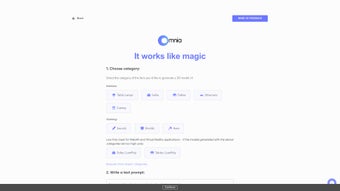
To generate your first 3D model, click on the “Create New Model” button. You’ll be prompted to either enter a text prompt or upload an image (when the feature is live). For example, type “a modern leather armchair with a chrome frame, mid-century design.” Omnia’s AI will analyze your input and generate a detailed 3D model within seconds.
You can then rotate, zoom, and inspect the model from all angles directly in your browser. Once satisfied, use the “Export” function to download your model in formats like .OBJ, .GLB, or .FBX. If you’re working with AR, select the AR export option to generate a compatible file for apps like Apple’s ARKit or Google’s ARCore.
For collaborative teams, Omnia allows you to save projects to your cloud workspace, share links, and track revisions. The interface is responsive and works flawlessly on desktops, tablets, and even smartphones. Regular software updates ensure performance improvements, new features, and enhanced security. Since Omnia is free to use with optional premium tiers, you can experiment without financial risk. Whether you're a solo designer or part of a creative agency, Omnia’s workflow is designed for speed, simplicity, and professional results.
Compatibility & System Requirements
Omnia is engineered to be platform-agnostic, meaning it works seamlessly across all major operating systems and devices. You can use it on Windows 10/11, macOS, Android tablets and smartphones, and iOS devices—including iPhones and iPads—without any compatibility issues. Since it’s a web-based application, there are no specific hardware requirements. All processing happens on Omnia’s secure cloud servers, so even low-end devices can run the tool smoothly.
For optimal performance, we recommend using a modern browser such as Google Chrome, Safari, or Microsoft Edge. Ensure your internet connection is stable, especially when uploading images or exporting large 3D files. The platform supports file uploads in .PNG and .JPG formats, with a maximum file size of 50 MB. This limit ensures fast processing while maintaining quality. If you need to upload larger files, consider compressing them using tools like TinyPNG or ImageOptim before uploading.
Omnia’s cloud infrastructure also means you don’t need to worry about software updates. The platform is automatically updated with new features, bug fixes, and security patches. This ensures you’re always using the latest version without manual intervention. Whether you're working from a home office, a design studio, or on a business trip, Omnia is always accessible from any device with a web browser. This level of flexibility makes it ideal for remote teams, freelancers, and creative professionals who need reliable tools on the go.
Pros & Cons of Using Omnia 3D Model Generator
- Pros:
- AI-powered text-to-3D generation for instant model creation
- Web-based—no installation required, works on all devices
- Supports AR asset export for real-world visualization
- Secure cloud processing with privacy protection
- Free to use with intuitive interface for beginners
- Compatible with Windows, Mac, Android, and iOS
- Future-ready with planned support for food and architecture
- Cons:
- Image-to-3D upload feature still marked as "coming soon"
- Currently limited to furniture design (though expanding)
- File size capped at 50 MB for uploads
- Advanced features may require a premium subscription
- Dependent on internet connection for full functionality
Frequently Asked Questions (FAQ)
Conclusion: Why You Should Download Omnia Today
If you're involved in furniture design, interior architecture, or product prototyping, Omnia is a must-try AI-powered 3D model generator. Its ability to create high-quality 3D assets from simple text prompts or future image uploads makes it a powerful tool for both beginners and seasoned professionals. With zero installation, cross-platform compatibility, and secure cloud processing, Omnia removes the barriers to entry in 3D design. The inclusion of AR export capabilities adds a professional edge, allowing you to showcase designs in real-world environments.
While it’s still evolving and currently focused on furniture, Omnia’s roadmap shows strong potential for broader applications. Whether you're a small business owner, a freelance designer, or part of a creative agency, this free, secure, and efficient tool can significantly boost your workflow. Don’t miss out on the future of design—download Omnia today and start generating stunning 3D models in minutes.



.png)



